The country field auto selects the country that the users IP resides in.
However - should you wish to always set a default country regardless of where the users IP resides - please do the following.
Please note: this functionality will only work for Express Capture Keys created after 11/11/2015. If you have an Express Capture page created before this you will need to go to ‘Create a new Key’ tab shown at Step 3, enter the URL or a name for the key, grab the new code snippet and verification code & place into your existing page mapping the fields again. Then you can complete the steps below to amend the list of countries Express Capture will show.
- Log into your My Account
- Go to Setup Express Capture
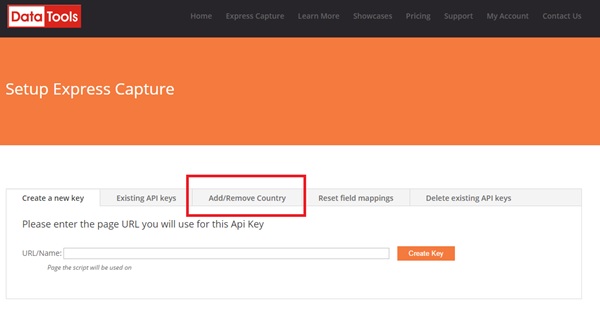
- Click on the tab “Add/Remove Country”
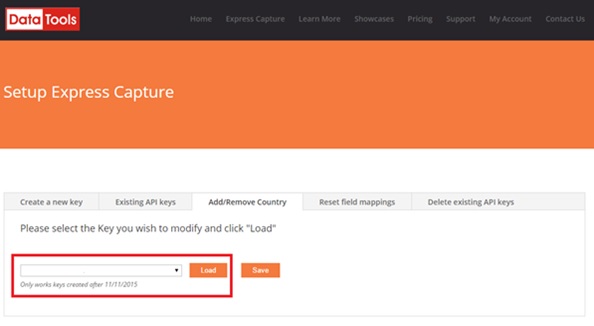
- Select which Express Capture Key you would like to limit the countries of from the drop down list and then click on the Load (Note: if you are uncertain as to which key is for which page – please click on the Existing API Keys to assist you)
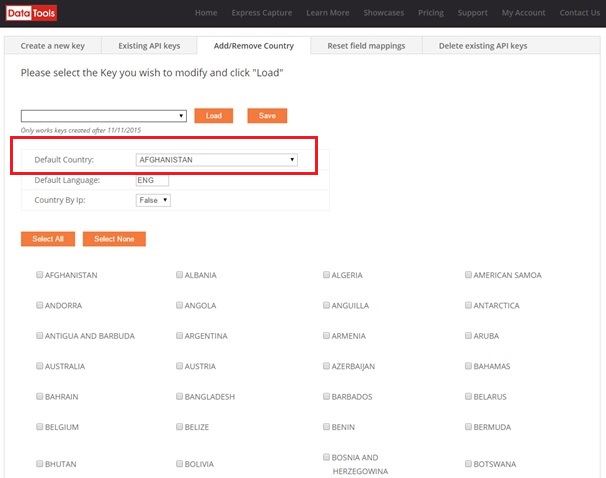
- At Default Country - select the country you would like to default to from the drop down list and Save.
0 Comments